Showing posts with label Silverlight. Show all posts

Tuesday, March 23, 2010

ScottGu’s lots of list of links…

March 21st Links: ASP.NET, ASP.NET MVC, AJAX, Visual Studio, Silverlight

I am not a big fan of pointing to other blog entries with long list of more links.  However I will make an occasional exception.  Scott Guthrie’s has posted 15 or more really interesting links to help us get up to speed on the latest development technologies including Silverlight, ASP.NET and ASP.NET MVC.

Enjoy!

Wednesday, March 17, 2010

MIX Keynote Day 1 – Windows Mobile 7

Finally Microsoft takes a real swing at Android, iPhone and Blackberry!

View the Day 1 keynote here
image

Where other phone competitors continue to fail at delivering Flash to the mobile device, Windows Mobile 7 delivers Silverlight on Windows Mobile 7.

In addition Windows Mobile 7 also delivers Zune Market place and 3rd party content music/video services as well. The Zune market place subscription model provides one of the best user experiences around.

Great mail and calendar support for the business users in addition to finally delivering a compelling social networking platform.

One key for Microsoft to really thrive past launch is a great application market where it easy to download and plenty of free/trial software.

I am really look forward to Windows Mobile 7!

Saturday, March 13, 2010

Force Visual Studio 2010 RC to use Silverlight 4

If you have installed the Silverlight 4 tools with the RC of Visual Studio 2010 you may need to make a registry update to force Visual Studio to use Silverlight 4 instead of Silverlight 3.

In the Registry editor (regedit.exe) change the following values

  1. Open the hive HKEY_CURRENT_USER\Software\Microsoft\VisualStuio\10.0_Config\DesignerPlatforms\Silverlight
  2. Change the value SilverlightHost from v3.0 to v4.0
  3. Navigate to the next hive
    HKEY_LOCAL_MACHINE\SOFTWARE\Wow6432Node\Microsoft\VisualStudio\10.0\DesignPlatforms\Silverlight
  4. Change the value here for SilverlightHost from v3.0. to 4.0
  5. Navigate to the Hive
    HKEY_USERS\.DEFAULT\Software\Microsoft\VisualStudio\10.0_Config\DesignPlatforms
  6. Change the value here for SilverlightHost from v3.0. to 4.0

image

If you need help getting the Silverlight 4 tools installed with the RC see my earlier blog post here.

Visual Studio 2010 RC1 and Silverlight 4 Tools

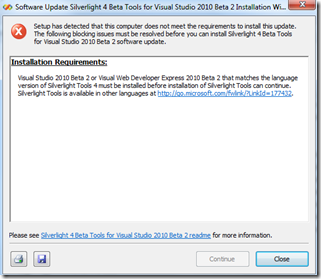
The current Silverlight Tools are currently targeting Visual Studio 2010 Beta 2. If you attempt to run the Silverlight4_Tools.exe with the release candidate for Visual Studio 2010 installed you will encounter the following error:
image

Visual Studio 2010 RC1 works just fine with the Silverlight 4 tools. To install them and get around the error, run the Silverlight4_Tools.exe when the error comes up in the screen shot above.

Leave this screen up and find the temporary install folder on the root of your windows drive (for most of you it will be in the root of the c:\ drive).  The temporary install folder will have the current date and time and look something like a long guid with no braces ‘{‘ or dashes ‘-‘.

Examples include:

C:\7729222c5765f31a2b3cbe75fd15d0f6

or

C:\be8ce60a1b13d3b959edb1a4dfdd50

Again you can also tell by just looking at the newest folder created on the root drive.

Create a new folder (anywhere on the computer) and give a name like SL4Install.

Copy contents of the temp folder to the SL4Install folder (remember don’t close the error dialogue yet).

Once you have folder content copied into the SL4Install folder click the close button on error dialogue

In the SL4Install open the ParameterInfo.xml file in a text editor like notepad.

image

Modify the following lines

Add a start comment to line 13 and the corresponding end comment to line 41. Effectively commenting out the entire <BlockIf>…</BlockIf> node.

<!-- <BlockIf DisplayText="Visual Studio 2010 Beta 2 or Visual Web Developer Express 2010 Beta 2 …

</BlockIf> -->

Save the file and close your text editor.

In the SL4Install folder run the SPInstaller.exe file (make sure Visual Studio, Blend and any other installs are closed or completed).

That’s it you should be able to use the Silverlight 4 Tools with Visual Studio 2010 RC.

Happy Programming!